CookieRun Classic PC Setup: Account Sync, Controls, and Upgrade Planning

图片
CookieRun Classic is easy to understand on mobile, but playing on PC can make long farming sessions and repeated mission attempts more comfortable. The important part is not just installing an emulator. You also need to protect your account, set useful keyboard controls, and avoid wasting early upgrade resources. I keep a full CookieRun Classic guide hub here: CRClassic.wiki . This post is a shorter PC-focused checklist. 1. Bind your account before trying PC Before installing the game on a second device, make sure your save is linked to a stable account system. That matters more than the emulator choice. If the save is not bound, uninstalling, resetting, or switching devices can create avoidable account loss risk. Check your current login method on mobile. Bind the account before testing another device. Do not enter passwords or account details on coupon generator sites. For a full first-week route, see the Cookie Run Classic Beginner Guide . 2. Choose the safest PC route first...

如何为网站绑定GA-google analytics账户?

今日金句——鱼离水则身枯,心离书则神索

了解GA(Google analytics)

Google Analytics(谷歌分析)是一种网络分析服务,由Google提供,用于跟踪和报告网站的流量。其主要功能包括:

  1. 流量分析: Google Analytics可以追踪网站的访问者数量、访问持续时间、页面浏览量等信息,帮助您了解网站的整体流量状况。

  2. 用户行为分析: 通过Google Analytics,您可以深入了解访问者在网站上的行为,包括他们访问的页面、点击的链接以及在网站上花费的时间。

  3. 来源分析: Google Analytics可以告诉您访问者是通过搜索引擎、直接输入网址、社交媒体还是其他途径来到您的网站的,从而帮助您了解流量的来源。

  4. 转化跟踪: 如果您在网站上设置了特定的目标,如购买商品、填写表单或下载文件,Google Analytics可以追踪这些转化事件,帮助您了解访问者在网站上的行为是否符合您的预期。

  5. 用户分群: Google Analytics可以根据不同的标准(如地理位置、设备类型、浏览器类型等)将访问者分组,帮助您更好地了解不同群体的行为。

  6. 实时数据监控: 提供实时数据监控功能,您可以随时查看当前网站的访问情况。

优势包括:

  1. 免费使用: Google Analytics基本版是免费的,适用于许多小型和中型企业,提供了强大的分析工具。

  2. 用户界面友好: Google Analytics提供直观且易于使用的用户界面,使用户能够轻松地访问和理解网站数据。

  3. 广泛的功能: Google Analytics不仅提供基本的流量分析功能,还包括深层次的用户行为分析、转化跟踪等多种功能,满足了不同用户的需求。

  4. 与其他Google服务集成: Google Analytics可以与其他Google服务(如Google Ads)无缝集成,帮助用户更好地了解其在线广告活动的效果。

  5. 定制化和报告: 用户可以根据自己的需求定制报告,选择关注的指标和维度,以更好地满足其特定的分析需求。

如何注册并给网站绑定GA(google analytics)账户

1. 注册账号:
https://analytics.google.com/analytics/web/provision/#/provision

点击开始之后,根据页面提示创建资源:


GA可以跟踪web,以及安卓和IOS的app数据。
保存好设置后,数据视图就创建成功了。

接下来就是添加视图代码,以网站为例,可以看到需要添加代码到网站的所有页面的<head>。
等添加成功后,下方界面的提示就会显示已经添加正常。
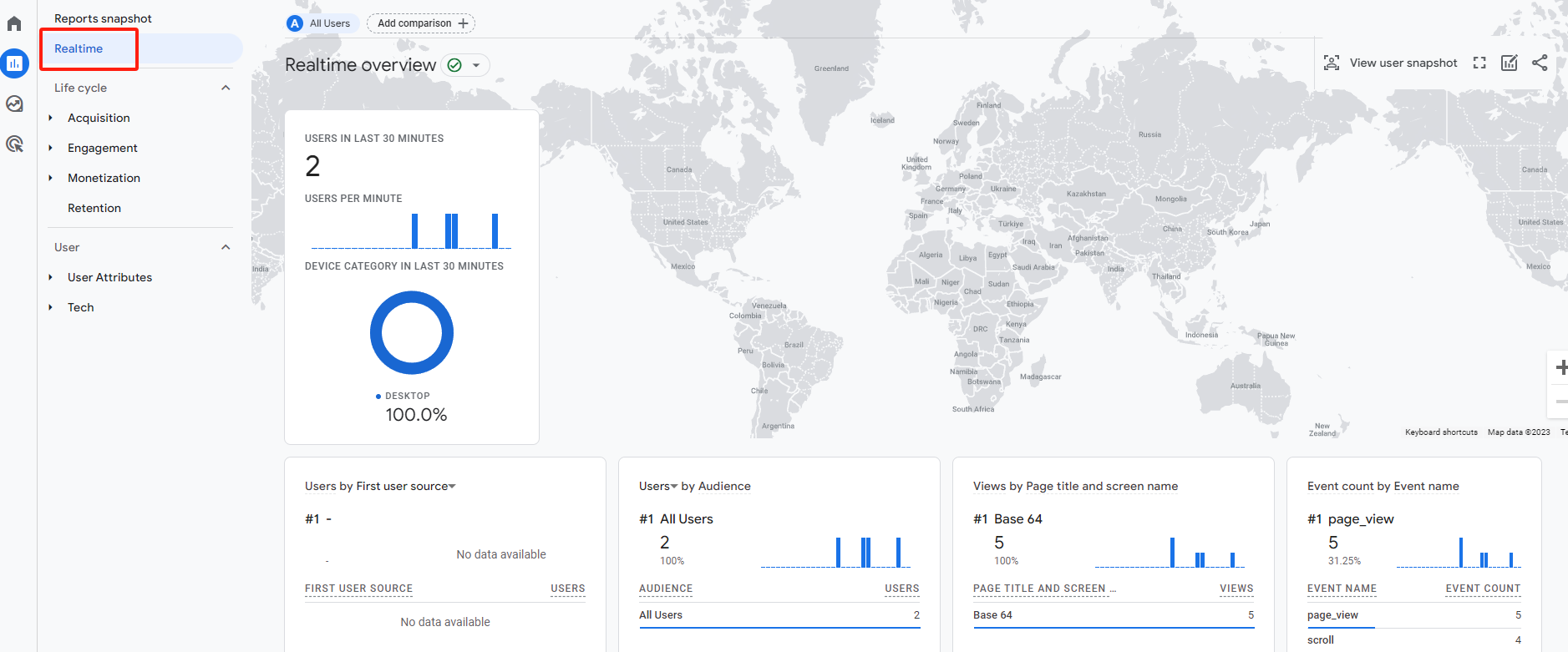
添加完代码后,进入视图,可以看到GA已经能够实时统计网站流量了。

关于“如何为网站绑定GA-google analytics账户?”的分享就结束了,希望对你有所帮助。

留几个问题:
1.  account和property有什么区别?

2. GA有哪些帮助做流量分析的功能?


评论

此博客中的热门博文

保姆级教程,教你如何在手机端使用Ghelper的VPN网络节点。

科学上网工具Ghelper的详细设置教程,看这一篇就够了。

appsflyer里的audience, AMS(all media sources)以及supported features的简单解读!